Multiple channels
Organise your teams by site, department or mission. Each channel is independent, with its own administrators and directory.
RealNotify Group centralises your channels, your members and your urgent communications. When a critical alert goes out, your members' phones ring like an incoming call — impossible to miss.
The solution
Create an account, structure your channels, add members with an expiry date — then broadcast your alerts. From the web interface or through the API.
One account, as many channels as your plan allows. Each channel has its own administrators, broadcasting rules and member directory.
When adding a member, set an expiry date matching how long that person stays active. Everything else is automatic.
A published alert reaches every channel member's phone instantly. In critical mode, it appears as an incoming call.
Critical mode
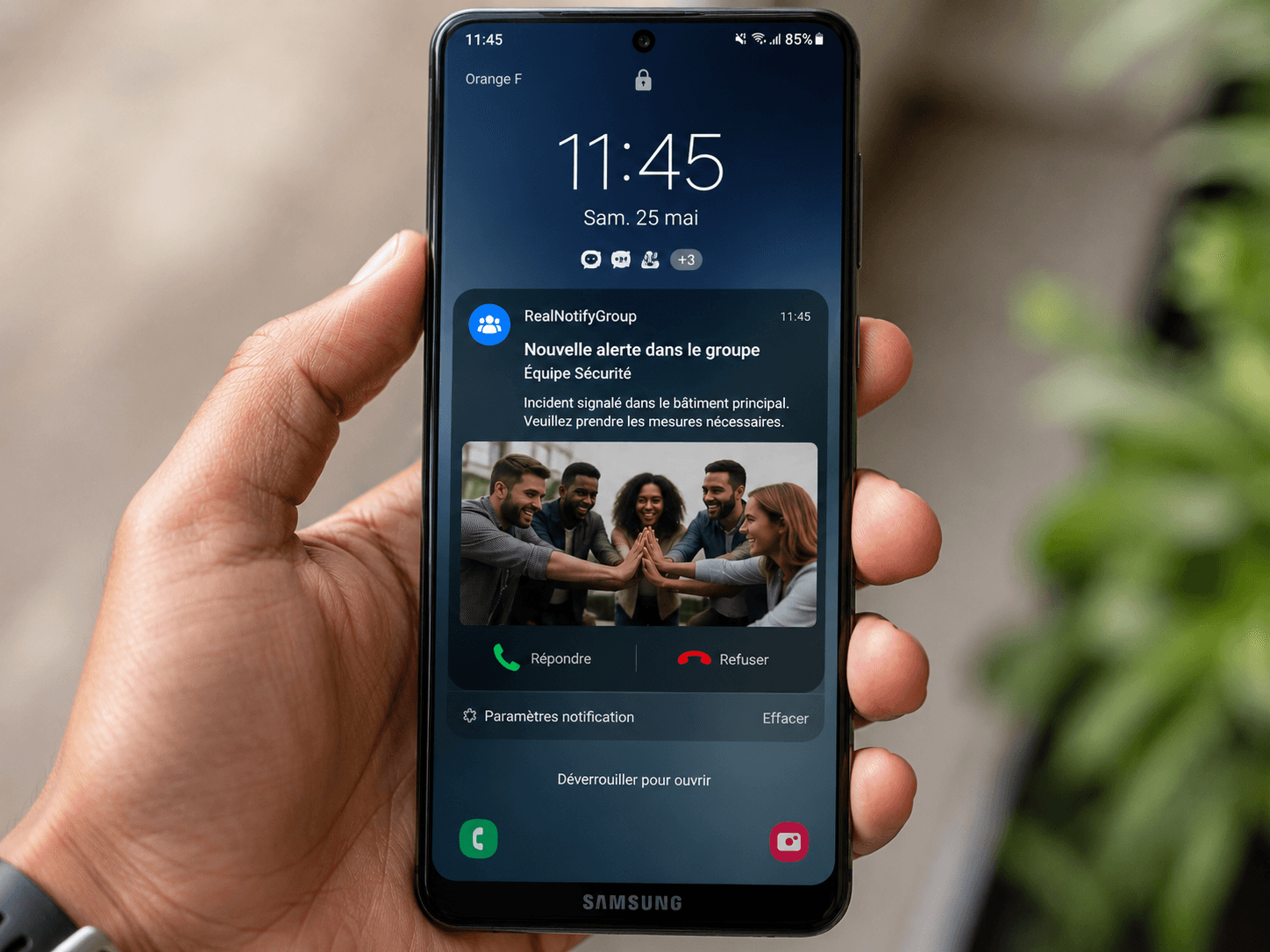
A standard notification gets lost in the noise. For important alerts, RealNotify triggers an insistent ringtone — alarm or phone-call style — with a full-screen display. The member picks up, and the app opens directly on the relevant message in the right channel.
The notification appears as an incoming call, even on a locked screen.
Members pick the ringtone played on their own phone, and it keeps ringing until the alert is acknowledged.
One tap and the app shows the exact message, in the right channel.
See who received, who read and who confirmed.
Security Team channel
Alert published by an administrator
Web interface or API call · 09:41:02
Notification pushed to 248 devices
Android & iPhone · 09:41:03
Call-mode ringtone triggered
Locked screens included · 09:41:03
Acknowledgement confirmed
231 confirmations · auto follow-up for the remaining 17
248
Sent
248
Delivered
231
Confirmed
Features
Organise your teams by site, department or mission. Each channel is independent, with its own administrators and directory.
Set how long each member stays active. On expiry, access is disabled or the member is removed from the channel — with no manual step.
Instant publication to every relevant member. Priority levels: information, important, critical.
Every channel has its own key, revocable at any time. Your systems broadcast to a specific channel, without account-wide access.
Android and iPhone. Members receive alerts from the channels they belong to, wherever they are.
Full history of alerts, read receipts and member movements, exportable.
Automation
Your teams manage channels and alerts from the platform. Your systems go through the API: creating channels, adding and removing members, setting expiry dates, sending alerts. Everything can be automated.
Read the documentation# Diffuser une alerte critique — clé d’API du compte
curl -X POST https://api.realnotifygroup.com/v1/alerts \
-H "Authorization: Bearer $RNG_API_KEY" \
-H "Content-Type: application/json" \
-d '{
"priority": "critical",
"title": "Intrusion — Site Nord",
"message": "Déclenchement zone B.",
"require_ack": true
}'Telegram Sub
Declare your bot and the channel it administers, register your members against an offer, and the platform takes it from there. Each person gets their invitation, their reminders before the deadline, and leaves the channel on the day — with nobody keeping a list by hand.
The bot token, and the channel it administers. The platform checks the access with Telegram, then keeps the token hidden.
An address, an offer. The offer carries the duration, and the duration sets the expiry date.
You hand each person a link to the bot. They start it, the bot recognises them and sends them a channel invitation in private, valid for them alone.
A warning message as the date approaches, then removal from the channel on expiry if nothing has been renewed.
RealNotify Bot
bot
/start
09:12Welcome. Your access to the Private Circle channel runs until 30 September. Here is your invitation, valid for you alone:
Single-use invitationt.me/+K3nQ…9fA09:12Your access ends in 3 days. Renew before 30 September to stay in the channel.
27 SepYour access has expired: you have been removed from the channel. A renewal brings you straight back.
30 SepTelegram forbids a bot from adding anyone to a channel, and rightly so: nobody is enrolled without wanting to be. The person takes the first step towards the bot — everything after that, the invitation, the reminders, the removal, happens without them.
Creating a configuration, registering a member and retrieving their link to the bot, renewing, sending a reminder, correcting an expiry, deactivating, expiring: each of these is an API route, called with your account key. Your shop takes the payment, your system registers the member — nobody opens the screen.
Read the documentationMobile apps
The app is where every alert lands. Install it, enter your email address, type the code you receive — and your channels appear.
Coming soon
Android or iPhone, it only takes seconds.
A confirmation code is sent to you right away.
You receive alerts from the channels you belong to.
Pricing
Annual pricing in US dollars. Unlimited alerts for the year, with no per-message cost.
To structure a first organisation.
For multi-team organisations.
For large-scale deployments.
Taxes excluded. You can move from one plan to another at any time.
Frequently asked questions
Another question? Write to us — we reply within 24 business hours.
When an alert is marked critical, the mobile app triggers an insistent ringtone — chosen by the member on their own phone — and shows a full-screen display similar to an incoming call, even when the phone is locked. Interacting with the notification takes the member straight to the relevant message, in the right channel.
Depending on the rule set for the channel, their access is automatically disabled or the member is removed from the channel. They then receive no further alerts. The date can be changed at any time from the interface or through the API.
Through a personal invitation. Telegram forbids a bot from adding anyone to a channel by force, so you hand the member a link to the bot, they start it, and the bot sends them a private invitation valid for one person only. From then on everything is automatic — the platform knows who they are and tracks their expiry.
It warns, then it removes. A warning message goes out in private before the date, leaving time to renew. If nothing changes, the member is removed from the channel on the expiry day. A renewal adds the offer's duration to the current expiry and brings them back into the channel; a suspension takes them out without erasing their history.
Yes. Creating and managing channels, adding or removing members, setting expiry dates and sending alerts are all available through the API. Each channel has its own key, letting a third-party application drive a specific channel without account-wide access.
On the Android and iPhone apps. The web interface remains the control centre for administrators: creating channels, managing members and broadcasting alerts.
No. The Standard and Professional plans include unlimited real-time alerts for the year. Only the number of channels, administrators and members varies by plan.
Yes, at any time. Your channels, members and history are preserved when switching plans. For needs beyond the Professional plan, the Enterprise plan is built with you.
Contact
Demo, Enterprise plan, API integration: describe your needs and our team will get back to you within 24 business hours.
Create your account, structure your channels and broadcast your first critical alert today.